

Back

Rahul Agarwal
Founder | Agentic AI... • 1m
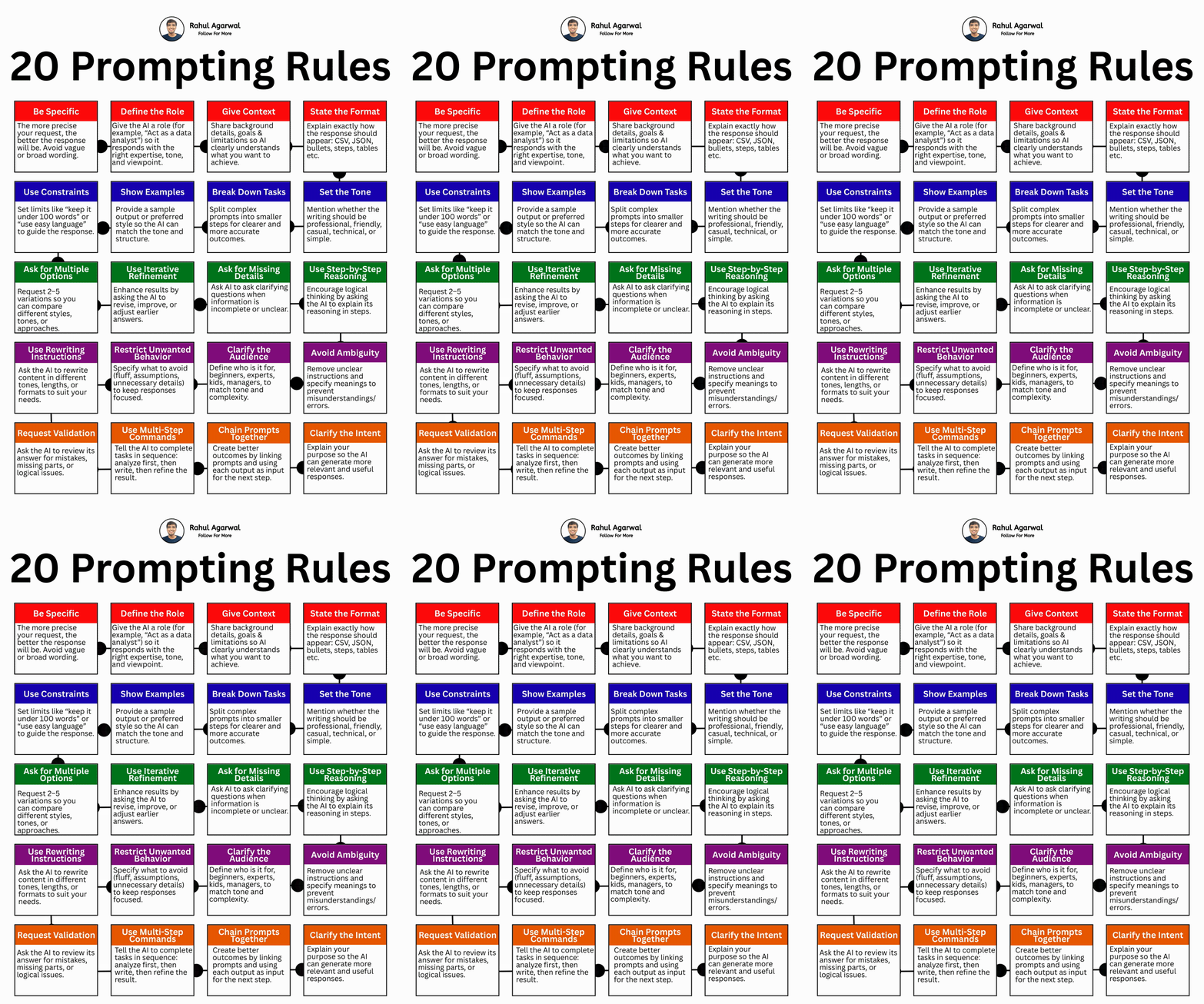
20 prompting rules everyone must know. I've explained each in simple below. 1) 𝗕𝗲 𝗦𝗽𝗲𝗰𝗶𝗳𝗶𝗰 Don’t ask vague things like “Explain AI.” Instead ask: “𝘌𝘹𝘱𝘭𝘢𝘪𝘯 𝘈𝘐 𝘪𝘯 5 𝘣𝘶𝘭𝘭𝘦𝘵 𝘱𝘰𝘪𝘯𝘵𝘴 𝘧𝘰𝘳 𝘣𝘦𝘨𝘪𝘯𝘯𝘦𝘳𝘴.” Clear request = better answer. 2) 𝗗𝗲𝗳𝗶𝗻𝗲 𝘁𝗵𝗲 𝗥𝗼𝗹𝗲 Tell AI who it should act like. Example: “𝘈𝘤𝘵 𝘢𝘴 𝘢 𝘮𝘢𝘳𝘬𝘦𝘵𝘪𝘯𝘨 𝘦𝘹𝘱𝘦𝘳𝘵.” This changes the style, depth, and tone. 3) 𝗚𝗶𝘃𝗲 𝗖𝗼𝗻𝘁𝗲𝘅𝘁 Explain your goal and background. Example: “𝘐’𝘮 𝘢 𝘴𝘵𝘶𝘥𝘦𝘯𝘵 𝘱𝘳𝘦𝘱𝘢𝘳𝘪𝘯𝘨 𝘢 𝘱𝘳𝘦𝘴𝘦𝘯𝘵𝘢𝘵𝘪𝘰𝘯.” Context helps AI understand your situation. 4) 𝗦𝘁𝗮𝘁𝗲 𝘁𝗵𝗲 𝗙𝗼𝗿𝗺𝗮𝘁 Tell AI how the answer should look. Examples: • bullet points • steps • table • JSON/CSV Format removes guessing. 5) 𝗨𝘀𝗲 𝗖𝗼𝗻𝘀𝘁𝗿𝗮𝗶𝗻𝘁𝘀 Set limits like: • under 100 words • simple English • no jargon Constraints shape the response. 6) 𝗦𝗵𝗼𝘄 𝗘𝘅𝗮𝗺𝗽𝗹𝗲𝘀 Give a sample output or style. AI copies patterns really well. 7) 𝗕𝗿𝗲𝗮𝗸 𝗗𝗼𝘄𝗻 𝗧𝗮𝘀𝗸𝘀 Big tasks confuse AI. Split them into smaller steps. Example: 1. Research 2. Outline 3. Write 8) 𝗦𝗲𝘁 𝘁𝗵𝗲 𝗧𝗼𝗻𝗲 Tell AI the vibe: • Professional • Casual • Friendly • Technical Tone changes wording and style. 9) 𝗔𝘀𝗸 𝗳𝗼𝗿 𝗠𝘂𝗹𝘁𝗶𝗽𝗹𝗲 𝗢𝗽𝘁𝗶𝗼𝗻𝘀 Request 2–5 versions. You can pick the best one. 10) 𝗨𝘀𝗲 𝗜𝘁𝗲𝗿𝗮𝘁𝗶𝘃𝗲 𝗥𝗲𝗳𝗶𝗻𝗲𝗺𝗲𝗻𝘁 Ask AI to improve its answer. Example: “𝘔𝘢𝘬𝘦 𝘪𝘵 𝘴𝘩𝘰𝘳𝘵𝘦𝘳 𝘢𝘯𝘥 𝘤𝘭𝘦𝘢𝘳𝘦𝘳.” 11) 𝗔𝘀𝗸 𝗳𝗼𝗿 𝗠𝗶𝘀𝘀𝗶𝗻𝗴 𝗗𝗲𝘁𝗮𝗶𝗹𝘀 Tell AI to ask questions if unclear. This prevents wrong assumptions. 12) 𝗨𝘀𝗲 𝗦𝘁𝗲𝗽-𝗯𝘆-𝗦𝘁𝗲𝗽 𝗥𝗲𝗮𝘀𝗼𝗻𝗶𝗻𝗴 Ask AI to explain in steps. This makes answers more logical and accurate. 13) 𝗨𝘀𝗲 𝗥𝗲𝘄𝗿𝗶𝘁𝗶𝗻𝗴 𝗜𝗻𝘀𝘁𝗿𝘂𝗰𝘁𝗶𝗼𝗻𝘀 Ask AI to rewrite in: • shorter version • different tone • different format 14) 𝗥𝗲𝘀𝘁𝗿𝗶𝗰𝘁 𝗨𝗻𝘄𝗮𝗻𝘁𝗲𝗱 𝗕𝗲𝗵𝗮𝘃𝗶𝗼𝗿 Tell AI what to avoid: • fluff • assumptions • long explanations 15) 𝗖𝗹𝗮𝗿𝗶𝗳𝘆 𝘁𝗵𝗲 𝗔𝘂𝗱𝗶𝗲𝗻𝗰𝗲 Who is this for? • kids • beginners • experts Audience changes complexity. 16) 𝗔𝘃𝗼𝗶𝗱 𝗔𝗺𝗯𝗶𝗴𝘂𝗶𝘁𝘆 Remove unclear instructions. Clear prompts reduce mistakes. 17) 𝗥𝗲𝗾𝘂𝗲𝘀𝘁 𝗩𝗮𝗹𝗶𝗱𝗮𝘁𝗶𝗼𝗻 Ask AI to double-check its answer. It can find mistakes or missing parts. 18) 𝗨𝘀𝗲 𝗠𝘂𝗹𝘁𝗶-𝗦𝘁𝗲𝗽 𝗖𝗼𝗺𝗺𝗮𝗻𝗱𝘀 Tell AI the order: 1. Analyze 2. Write 3. Improve This gives better results. 19) 𝗖𝗵𝗮𝗶𝗻 𝗣𝗿𝗼𝗺𝗽𝘁𝘀 𝗧𝗼𝗴𝗲𝘁𝗵𝗲𝗿 Use output from one prompt in the next. This builds complex workflows. 20) 𝗖𝗹𝗮𝗿𝗶𝗳𝘆 𝘁𝗵𝗲 𝗜𝗻𝘁𝗲𝗻𝘁 Explain 𝘸𝘩𝘺 you want the answer. Purpose helps AI give more useful results. Sounds obvious, but if you follow these 20 rules, your AI gives much more accurate and useful results. ✅ Repost for others who still don't prompt the right way.
More like this
Recommendations from Medial

















/entrackr/media/post_attachments/wp-content/uploads/2021/08/Accel-1.jpg)























Download the medial app to read full posts, comements and news.